 Turkey (Turkish)
 Germany (German)
 Worldwide (English)


Industry-focused design language
Corporate navy, balanced card layouts and a professional conversion-focused presentation

 Halkali merkez neighborhood fatih st ozgur apt no 46 , Kucukcekmece , Istanbul , 34303 , TR
ExpertCheck is an automotive-focused website script for managing vehicle inspection services, packages, galleries, service areas, reviews and customer enquiries.
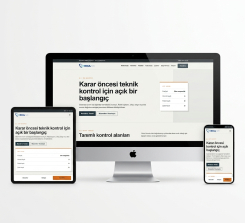
Corporate navy, balanced card layouts and a professional conversion-focused presentation. Services, corporate pages, images, contact enquiries and website settings can be managed from a user-friendly administration panel.
Corporate navy, balanced card layouts and a professional conversion-focused presentation
Services, pages, images, customer enquiries and core website settings are managed from one administration panel.
Manage services with titles, descriptions, images, ordering and publication status from the administration panel.
The interface works across desktop, tablet and mobile while bringing content, media, enquiries and site settings into one administration area.
Manage content, images, services, forms and core website settings from one central panel.
Manage services with titles, descriptions, images, ordering and publication status from the administration panel.
Showcase completed work with images, descriptions, categories and links on professional project pages.
Publish sector articles, announcements and informative content to support customer communication and organic visibility.
Organise services, projects, products and other content into categories for a clear and easy-to-navigate website.
Update homepage images, promotional copy, links and campaign areas from the administration panel.
Present staff members with photographs, titles, expertise and profile descriptions.
Publish client brands, ratings and customer messages in trust-building showcase areas.
Track names, phone numbers, email addresses, subjects and messages submitted through website forms.
Promote services, projects and your business through image galleries and video links.
Publish brochures, price lists, presentations and corporate documents in an organised download area.
Manage branch addresses, phone numbers, maps, coverage areas and local contact information from one place.
Present sector-specific products, rooms, menus, packages or solutions with images and dedicated detail pages.
Add multiple images and, where supported, manage options, sub-options and price differences.
Allow visitors to add items to a cart and track order details through the administration panel.
Configure supported options such as PayTR, Paymax, Shopier and bank transfer with your own provider credentials.
Collect visitor email subscriptions and maintain an organised list for announcements and campaigns.
Manage friendly URLs, meta titles, descriptions and keywords for individual content pages.
Edit navigation links and corporate pages such as About, Privacy and Terms from the panel.
Manage logos, favicons, contact details, social links, colours and visible modules from one settings area.
Create administrator accounts and limit panel access according to supported permission areas.
Review page views, business counters and management summaries to understand website performance.
Manage Instagram, Facebook, YouTube, LinkedIn, X, Telegram and WhatsApp links across the website.
Configure the SMTP server, port, sender address and recipient details used by website forms.
Publish common questions and answers to help visitors make informed decisions.
Record customer support requests, track responses and manage the communication process from one panel.
Manage pages, services, blog content, menus and page-level SEO settings from one workspace.
Manage sector-specific products, packages, services, branches, coverage areas or portfolio records centrally.
Follow contact, quote, appointment, reservation or support enquiries according to the modules included in the product.
Edit sliders, galleries, team profiles, references and corporate showcase areas with their images.
Configure website settings, branding, administrator accounts, email and supported integration options.
ExpertCheck is an automotive-focused website script for managing vehicle inspection services, packages, galleries, service areas, reviews and customer enquiries.
[email protected]
demo
Vehicle inspection centres
Used-car inspection companies
Automotive service and maintenance businesses
Corporate vehicle assessment companies
Dealer and fleet inspection services
The product’s administration panel, content modules and sector-focused use cases are presented in detail on this page.
Apache or Nginx with SSL and search-friendly rewrite rules is recommended.
PHP 7.4 or later compatible hosting; select the exact version according to the delivered source package.
MySQL 5.7+ or MariaDB 10.4+ with utf8mb4 support is required.
A dynamic PHP and MySQL/MariaDB website application with an administration panel.
PDO MySQL, mbstring, OpenSSL, JSON, cURL, fileinfo and an image-processing extension are recommended.
Upload the files, create the database, import the installation file supplied with the product and configure the connection settings.
For production use, change the demo account, enable SSL and grant writable directories only the permissions they require.
Yes. The page is based on the product’s current administration and content structure. Payment, email and other third-party services may require valid provider accounts.
Yes. Website content, images, forms and core settings can be edited through the product’s administration panel.
Yes. Supported content includes friendly URLs, meta titles, descriptions and keyword fields. Rankings also depend on content quality, technical performance and site authority.
Products that list this capability include cart and order record management. Live payment and checkout require correct provider and application configuration.
Use the “Open Demo Admin” button on the product page. The shared demo account is [email protected] and the password is demo.
The one-time licence fee is 5,000 TRY + VAT. The “Buy Now” button opens the related EkaSunucu order page.
No. The price covers the software licence only. Domain registration, hosting and requested custom development are evaluated separately.
ExpertCheck is an automotive-focused website script for managing vehicle inspection services, packages, galleries, service areas, reviews and customer enquiries.