Arama Yap Mesaj Submit
Request a Callback
+90
X
X

Select Your Currency

Turkish Lira $ US Dollar Euro
X
X

Select Your Currency

Turkish Lira $ US Dollar Euro

Contact Us

Location Halkali merkez neighborhood fatih st ozgur apt no 46 , Kucukcekmece , Istanbul , 34303 , TR

What is MX Record?
2026 E-Mail Security Guide

Learn what MX records are, the backbone of your email traffic, how they work, and how to optimize them according to 2026 SEO/Security standards (SPF, DKIM, DMARC). Stop ending up in the spam box!

MX Record and Email Security

Mail Exchange (MX) Registration What is it?

MX (Mail Exchange) recordIt is one of the most critical parts of the DNS (Domain Name System) hierarchy, which determines which server e-mails sent to a domain will be directed to. To put it simply; The MX record is a traffic sign that tells the Internet's mail distributors to "Deliver incoming letters for this domain to this address."

someone to you [email protected] When you send an e-mail to , the sender's server asks the DNS system "Who receives yourcompany.com's letters?" he asks. The DNS system looks at your MX records and responds "mail.yourcompany.com server is authorized" and the e-mail is forwarded to that server.

Technical Information:

MX records must always point to a Hostname (Ex: mail.google.com) and not to an A record (IP address) or a CNAME record. Writing a direct IP address is against RFC standards and may cause delivery problems.
DNS Infrastructure

MX is a special unit that manages e-mail traffic within the DNS records, which are the identity card of your domain name.

Priority

In MX records, the priority value (such as 0, 10, 20 determines which server will be tried first. Low number = High priority.

Why MX Record Vital Importance Does it carry?

As of 2026 , service providers such as Google and Yahoo have raised standards in e-mail security to the highest level. An incorrectly configured MX record not only causes you not to receive emails, but also results in loss of reputation.

Uninterrupted Communication

Correct MX configuration ensures that order, support or communication e-mails from your customers reach you at a rate of 100 .

Redundancy

By entering more than one MX record, you can ensure that the secondary server queues emails even if your main server crashes.

Spam Engelleme

Ensuring that your MX records are compatible with SPF and DKIM prevents the e-mails you send from ending up in recipients' spam boxes.

Step by Step MX Configuration

Depending on the panel you use, updating MX records is quite simple. Below are the operations in the most common panels for Eka Sunucu customers.

  • 1. Accessing DNS Management Panel

    Log in to your hosting panel (cPanel, Plesk or DirectAdmin) to which your domain name is connected. Find the "Zone Editor" or "DNS Settings" section.

  • 2. Check Existing Records

    Examine existing MX records. If you have moved hosting, you may need to delete the records of the old company. cPanel If you are using it, click the "Manage" button.

  • 3. Adding a New Record

    Enter the values your provider gave you, as in the example below:

    Record Type Ad (Host) Priority Destination TTL
    MX @ (or yourdomain.com) 0 mail.yourdomain.com 14400
    MX (Yedek) @ 10 mx2.yedekserver.com 14400
  • 4. Wait for DNS Propagation

    It may take between 1 and 24 hours for the changes you make to become active worldwide (DNS Propagation). During this period, some emails may go to the old server.

2026 E-Mail Security Standards: SPF, DKIM and DMARC

Just creating an MX record is not enough in today's cybersecurity world. As Eka Sunucu, our service contract We prioritize security on all our servers.

In order for your e-mails to be sent to the "Inbox", you must create the following 3 record that supports MX record:

1. SPF (Sender Policy Framework)

Specifies which IP addresses can send e-mail on your behalf. What is SPF Record? Check out our article.

2. DKIM (DomainKeys Identified Mail)

By adding a digital signature to your emails, it proves that they have not been altered in transit. DKIM Detailed Information.

3. DMARC

Tells the receiving server what to do (reject, quarantine) if SPF and DKIM verification fails. DMARC Configuration Guide.

Attention!

Gmail and Yahoo have made DMARC registration mandatory for bulk email senders starting from 2024. In 2026 standards, e-mail delivery has become almost impossible without these records, even for personal domains. Eka Sunucu Corporate Email In these services, these settings are made automatically by our expert team.

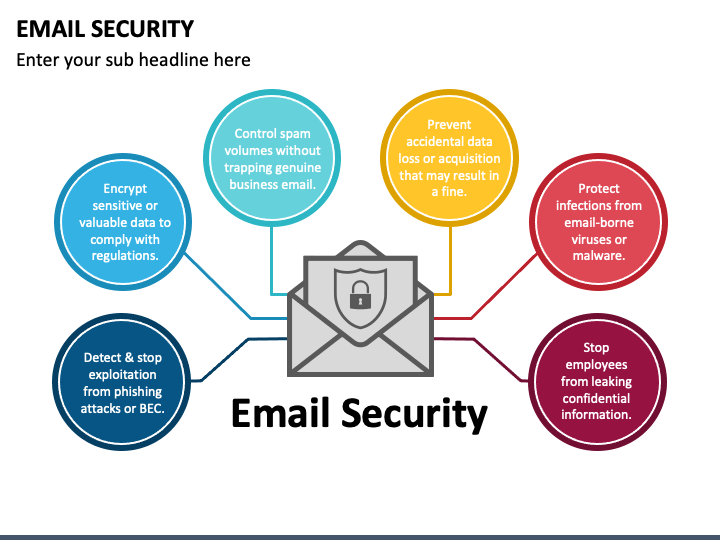
Email Security Flow

Frequently Asked Questions (FAQ)

Will changing the MX Record delete my existing emails?
No, just changing the MX record new It changes the direction of incoming e-mails. However, if you do not move the e-mails from your old server to the new server, you may lose access to your old e-mails. Eka Sunucu technical support team can assist you with e-mail migration.
Can I enter more than one MX record?
Yes, definitely recommended. You can establish a redundant structure by giving different priority values ​​(0, 10, 20 etc.). If 0 priority server cannot be reached, the sending server tries 10 priority server. In this way, you will not experience any e-mail loss.
What are Local Mail Exchanger and Remote Mail Exchanger?
It is the "Email Routing" setting in cPanel. If your e-mails are hosted on the same server, "Local" should be selected. If your e-mails are on a different server such as Yandex, Google Workspace or Eka Sunucu Corporate Mail, "Remote" should be selected. Wrong selection will prevent you from receiving emails.
How long does it take to update MX records?
Propagation of DNS changes globally typically takes 1 to 4 hours, but can technically take up to 24-48 hours. It is possible to shorten this time by reducing the TTL (Time To Live) value.

Do You Need a Professional Email Solution?

Get rid of spam problems, undelivered emails and quota problems. %100 Meet our highly secure corporate e-mail services with Inbox guarantee.

Check out the packages
Top